
Binary or Linear? The Hidden Math Behind Faster Code
Follow a simple search problem to understand the power of Big O notation.


Rohit is building a phone app where users can search for a name and get the corresponding phone number. He now faces an important decision: should he use a simple (linear) search or a binary search?
If he implements a simple search, it will be less complicated — easier to write, less error-prone, and quick to implement. On the other hand, a binary search will be much faster but slightly more complex to code. To make the right choice, Rohit decides to investigate how much faster binary search really is.
A Quick Refresher: What Is Binary Search?
Binary search is a searching algorithm used to find an element in a sorted array. Instead of checking every element one by one (like linear search), binary search repeatedly cuts the search space in half. This makes it much faster for large datasets.
Here’s a simple Python implementation:
sorted_arr = [10, 20, 30, 40, 50]
search = 40

low = 0
high = len(sorted_arr) - 1
found = False

while low <= high:
    mid = (low + high) // 2

    if sorted_arr[mid] > search:
        high = mid - 1
    elif sorted_arr[mid] < search:
        low = mid + 1
    else:
        print(mid)
        found = True
        break

if not found:
    print(None)
In this example, binary search will find 40 in just 2 iterations. A simple linear search, however, would need 4 iterations. Clearly, binary search is faster.
But how much faster? And does this difference grow as the data grows? Let’s investigate.
Measuring Performance: A Naive Approach
Rohit decides to measure the time difference between the two approaches. Let’s assume each iteration takes 10 ms.
sorted_arr = [10, 20, 30, 40, 50, 60, 70, 80, 90, 100]
If we search for 100:
Linear Search: 10 iterations → 10 × 10 ms = 100 ms
Binary Search: 4 iterations → 4 × 10 ms = 40 ms
It seems binary search is 2.5 times faster. But is that conclusion reliable?
Scaling Up: Where the Real Difference Appears
Rohit increases the size of the array and records how many iterations each algorithm needs to find the last element:
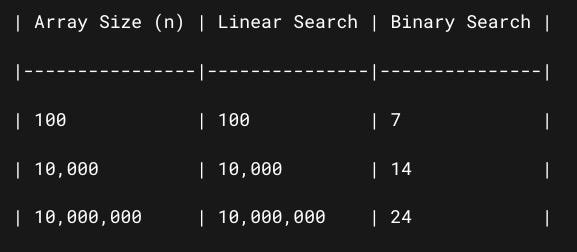
Now the difference is dramatic.
For 10,000,000 elements, linear search takes 10,000,000 × 10 ms = 100,000,000 ms (over 27 hours).
Binary search takes 24 × 10 ms = 240 ms (less than a quarter of a second).
If Rohit had trusted his initial estimate of “2.5× faster,” he would have been completely wrong. The speed difference grows massively with larger input sizes.
Why Time Isn’t Enough: Enter Big O Notation
This brings us to an important lesson:
👉 We cannot measure algorithm speed by actual time alone — it depends on the size of the input.
We need a way to describe how an algorithm’s runtime grows as the input grows. That’s where Big O notation comes in.
Big O expresses the runtime of an algorithm in terms of how it scales with input size (n) — not in milliseconds or seconds, but in how many steps it takes as n increases.
For example:
Linear Search: O(n) — the number of steps grows directly with
n.Binary Search: O(log n) — the number of steps grows with the logarithm of
n.
If Rohit had known this, he wouldn’t have needed to write a timing program to figure out which algorithm was faster — he could have predicted it just by looking at their time complexities.
A Quick Primer on Logarithms
If you’re unfamiliar with logarithms, here’s a simple explanation:
The logarithm answers the question:
“How many times must I divide a number by a base to get down to 1?”
In computer science, we usually use base 2, because many algorithms (like binary search) reduce the problem size by half each step.
Mathematically:
log₂(n) = kmeans2^k = n.
For example:
log₂(100) ≈ 6.64 (~7)because2⁷ = 128.
This explains why binary search takes ~7 steps in the worst case for 100 elements.
So when we say an algorithm is O(log n), it means the number of steps grows much more slowly than the input size itself.
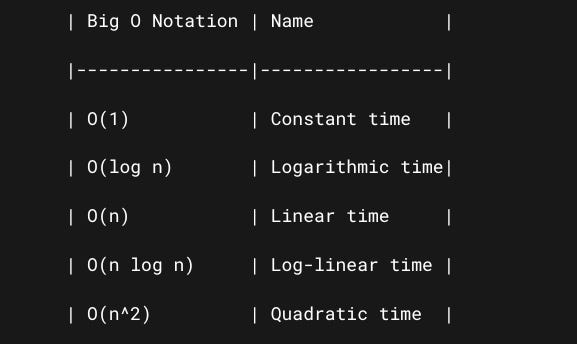
Common Big O Notations (Fastest → Slowest)
Summary
Measuring runtime in milliseconds is misleading — it depends on hardware, language, and implementation.
Big O notation gives a language-independent way to talk about performance by showing how runtime grows with input size.
Linear search is O(n) — slow for large inputs.
Binary search is O(log n) — much faster because it reduces the problem size exponentially with each step.
Understanding Big O helps you make better algorithmic choices without writing a single benchmark.
With this knowledge, Rohit can confidently choose binary search for his phone app — and you can make smarter choices in your own code too.